Step-by-Step Guide How to Unpin on Pinterest
Published

Saved a Pin by accident or want to clean up your Pinterest boards? Learning how to unpin on Pinterest is simple, whether you're using your phone or computer.
Although Pinterest doesn't have a dedicated "Unpin" button, you can remove saved Pins using the Delete option. If you're wondering how to unpin on Pinterest, the process only takes a few steps.
In this guide, we'll explain how to unpin on Pinterest on mobile and desktop, remove multiple Pins, and understand what happens after deleting them.
How to Unpin Something on Pinterest Using a Phone?
Whether you're using an iPhone or Android device, removing a saved Pin is straightforward.
Open Pinterest. Launch the Pinterest app and sign in.
Go to your profile. Tap your profile picture in the bottom-right corner.
Find the Pin. Open the board containing the Pin you want to remove.
Open editing options. Tap the Pin, then tap the three-dot menu or edit icon in the upper-right corner.
Delete the Pin. Select "Delete this Pin" or the available Delete option.
Confirm deletion. Tap Delete to remove it.
That's it! The Pin will disappear from your saved collection.
The exact button labels may vary depending on your app version. You can check Pinterest's official instructions for deleting Pins if your interface looks different.
How to Unpin a Pin on Pinterest Using a Computer
If you prefer using Pinterest on your laptop or desktop, follow these steps:
Visit Pinterest.com and sign in.
Click your profile picture in the upper-right corner.
Open the board containing the Pin.
Click the Pin to open it.
Click the three-dot menu and select Edit Pin.
Click Delete in the bottom-left corner.
Confirm by clicking Delete again.
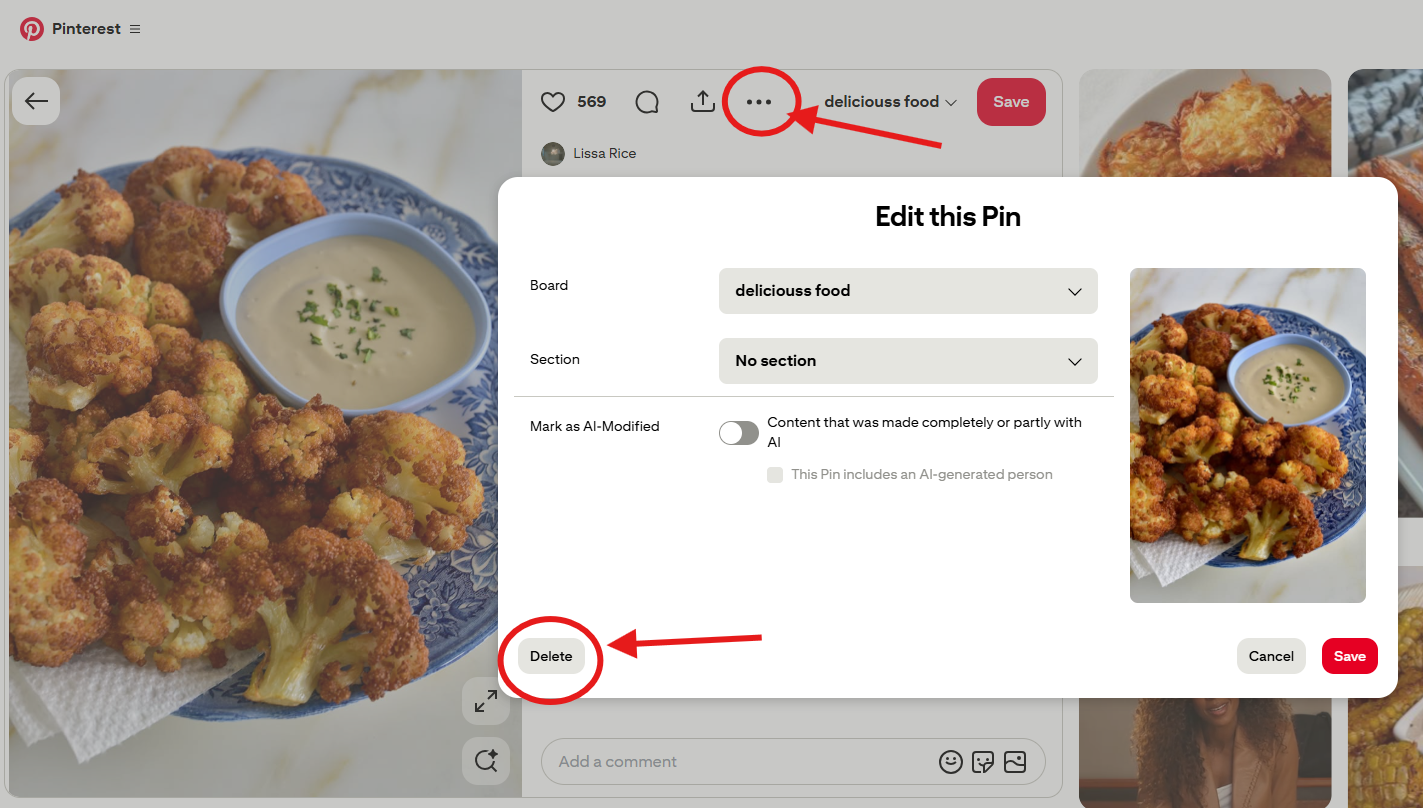
Your Pin will be removed from your saved collection immediately.
How to Unpin Multiple Pins on Pinterest at Once?
Removing one Pin is easy, but what if you want to delete dozens or hundreds of outdated Pins?
Pinterest offers board organization tools, although the available actions may vary by interface. For larger cleanup tasks, an alternative is PinDeleter, a tool designed specifically for bulk Pinterest Pin deletion.
With PinDeleter, you can:
Connect your Pinterest account securely.
Browse Pins from your connected account.
Filter Pins by board or search for specific content.
Select multiple Pins simultaneously.
Review your selection before deleting.
This can save time when cleaning up large boards or removing content that no longer fits your interests.
Important: Always review your selection carefully, since Pin deletion is permanent.
What Happens When You Unpin Something on Pinterest?
When you unpin on Pinterest by deleting a saved Pin, it disappears from your board or profile collection. However, deleting a Pin from your account doesn't necessarily remove copies saved by other users.
Frequently Asked Questions
Can You Unpin on Pinterest Without Deleting the Original Pin?
Yes. Removing a Pin you saved from another creator doesn't delete the original content from that creator's account.
How Do I Unpin Something on Pinterest That I Saved by Accident?
Open the saved Pin, select its editing options, and choose Delete. Confirm the action to remove it from your collection.
Can You Recover an Unpinned Pin?
Pinterest doesn't offer a recovery option for deleted Pins. However, you may be able to find and save the original content again if it remains available.
Can You Move a Pin Instead of Deleting It?
Yes. Pinterest lets you move saved Pins between boards and sections, making it possible to reorganize content without removing it.
Knowing how to unpin on Pinterest makes managing your saved content much easier. Whether you're using an iPhone, Android device, or computer, removing an unwanted Pin takes only a few steps.
For bigger cleanup projects, PinDeleter offers a faster way to select and delete multiple Pins without handling them individually.